


One of the main features of any programming language is decision
making.
When writing a program there will be a time when the program must
examine some data and determine by preprogrammed conditions what to
do.
Some decisions that might be encountered in a shell script are: if an
end of file (EOF) marker is reached, proceed to the next file; if the
file is write protected, display an error message to the user; or if a
number n is greater than another number m, terminate script.
Each of these statements has the form if [some condition] then
[do something] which is the general form of a branch statement
in the C shell.
The shell will examine the condition and decide what to do based on
the result of the examination, or test.
The actual form of the if statement is as follows:
if [condition_1]
   command list
else if [condition_2]
   command list
else if [condition_3]
   command list
     .
     .
     .
else if [condition_n]
   command list
else
   default command list
endif
When a test of a condition returns a TRUE value (non-zero) the commands
listed immediately following the condition are executed and the
construct is exited with command execution beginning after the
endif statement.
If a test returns a FALSE value (zero) the next else or
else if (if either are present) is executed.
The else statement contains the last command list and acts as a
default situation - if all else fails, execute these commands.
The else statements are optional and may be omitted if a single branch
test is all that is required.
The minimum if test would then be if [condition] command list
endif.
The endif is required any time an if statement is used.
Every time a command is executed, an integer value is returned
depending on the success of the command execution.
If the command executes as desired without incident, a zero is
returned.
For example, the grep command can be used to see if a user is logged
onto the system by piping the output of a who command to it, such as
% who | grep jblow
jblow     tty1    Dec 22 2:42
% echo $?
0
The command demonstrated that jblow was logged onto the system, but
more importantly, so did the return value of zero.
Had jblow not have been on the system, the who grep
command would have returned a non-zero value as the search would have failed.
This fact gives a new way of testing command success in shell scripts.
The above commands could have been placed in a C shell script like the
following:
#!/bin/csh
#
# usron checks to see if the userid given as an argument
# is logged on to the system
#
# Usage: usron id_name
#
who | grep $1 > /dev/null
if (! $status) then
   echo ``$1 is logged on''
else
   echo ``$1 is not logged on''
This script may look a bit more complicated than the last example, but
there is not much new here.
The test checks the return value of the pipeline and returns a string
depending on which case is true.
The $status holds the return value of the last executed
command.
It is the same as the $? in the Bourne shell.
It is important to notice a subtle, yet important, detail here.
The if condition will execute the command list if the expression
inside the parentheses has a non-zero value.
The $status variable returns a zero if the last command executed
properly (or in the case of the grep command, returned a
match), and a one otherwise.
While this may well seem backwards relative to the if condition
evaluation, it can be easily handled by placing a (!) before
the test.
The $1 refers to the first argument given on the command line after
the script name which allows the user to use the script to check on
any user without having to alter the script.
The only new idea in this script is the redirection of the output of
the pipeline to /dev/null.
The null device (/dev/null) is really just a place to dump
unwanted output.
Anything that is sent to the null device vanishes without a trace.
It is important to realize that nothing can be recovered from this
device so care must be taken when redirecting anything there.
If the output of the pipeline had not been sent to the null device, it
would have been sent by default to the stdout (the screen) and make an
ugly output.
When designing and testing a script it is nice to send the output to
either to the screen or a file for examination of any problems that might
arise.
The above example also illustrates what we consider to be good form in script documentation. Documentation is an important aspect of any programming task, and UNIX script programming is no exception. The example shows two important documentation features, a description of the script and a line describing its usage such as arguments and or options. Since this script was relatively short, further documentation is not necessary, but more would likely be included in longer more complicated scripts.
When writing scripts to handle system related tasks, it is often necessary to have the programs make decisions based on file status. For instance, a file might be checked to determine if it is a file before sending it to a printer, or a directory might be checked for set write-access bits. The shell provides a method for testing file attributes. If one of the flags (or operators) in table 4.6 is placed before a filename in an if construct test, a boolean truth value causes the direction of the branch.
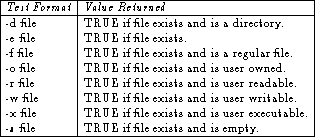
Table 4.6: Operators that test file attributes.
For example, if a.out was executable:
% if (-x a.out) echo ``Yes''
Yes
would be the result of a test of executability.
Of course tests such as these are much more useful in a script since
any of the information attained in this manner from a command line
could have been acquired more easily from a long listing (ls -l).
The negation operator (!) can be used to negate the truth value
of any test if it is placed before the test operator.
Logical AND (&&) and OR (||) operators can also be used
to make compound condition statements such as
#!/bin/csh
#
# prok checks to see if filename is a file and user readable
# before attempting to print it
#
# Usage: prok filename
#
if (-f $1 && -r $1) then
   lpr -Php_printer $1
else
   echo ``Error:: $1 cannot be printed''
endif
Comparing string patterns will often be a required task when shell
programming in the UNIX environment.
The grep command is often useful when dealing with strings, but string
comparisons can be built into the scripts themselves.
A typical string comparison would look something like
if (``APPLE'' == ``ORANGE'') then
   echo Match
else
   echo No Match
endif
which would result in the string No Match being echoed to the screen.
There are four comparators for checking string equivalence in the C
shell.
The == and =~ check for right and left string equivalence,
while the != and !~ check for non-equivalence.
While all four can be used on strings, the =~ and !~
comparators match the string on the left against a filename
substitution on the right.
This makes it possible to use a simple if statement rather than the
switch statement for pattern matches.
The C shell goes much further than the Bourne shell in its dealing
with arithmetic operations.
Arithmetic in the C shell is quite easy to implement.
To give an integer value to a variable, the same procedure described
in the variable section is used.
For example, set X=10, would put the integer value 10 in
the variable name X.
To square X and place the value in a variable called
SQR, the following expression would be used:
% set X=10
% @ SQR=$X * $X
% echo $SQR
% 100
The @ operator tells the C shell that what is about to follow
is an arithmetic expression.
Care must be taken to use whitespace when writing arithmetic
expressions to prevent complaints from the shell.
Table 4.7 is a list of the arithmetic operators
(including comparisons) provided by the C shell:
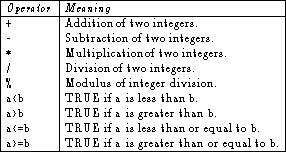
Table 4.7: Comparison operators in the C shell.
When evaluating arithmetic expressions, the C shell uses order of
precedence.
This means that A*B+C will have different meaning than
A*(B+C) and the user will have to know what he wants to ensure
that the proper parentheses are put into place.
Like the C programming language, the C shell provides a wide variety
of assignment operators to simplify expressions.
For example, adding 10 to the variable SUM would
normally look like this
@ SUM = $SUM + 10
but it could also be written as follows
@ SUM += 10
which is more to the point although it requires a bit of getting use to for people who are not use to the C programming language. A complete list of arithmetic assignment operators is contained in table 4.8.
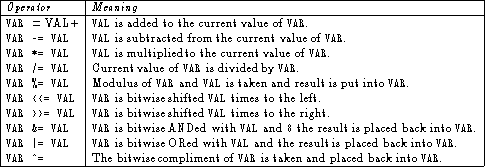
Table 4.8: Arithmetic operators in the C shell.
The bitwise operators above are special operators that allow
operations to be carried out on bit patterns (ones and zeros).
For example the decimal number 7 can be written as the binary number
0111.
The bitwise shift operators do just that, they shift the bit pattern
in one direction or another.
12 >> 2 shifts the bit pattern for 12 two places to the
right resulting in the decimal number 3.
The actual binary shift would look like
 12    >> 2    3
1100          0011
3 << 2 would shift it back to 12 again.
Bitwise shift to the right can be looked at as dividing a number by 2,
while bitwise shifting it to the left could be viewed as multiplying
it by 2.
The bitwise AND operation compares each bit (in terms of its place) in two patterns and results in a 1 where there were 1's in each and a 0 otherwise.
5 & 12 would result in 4       5  0101
                              12  1100
                          5 & 12  0100
8
The bitwise OR operation compares bits in the same fashion as the AND
but results in a 0 only if no 1 was in either pattern.
5 | 7 would result in 7        5  0101
                               7  0111
                           5 | 7  0111
The bitwise compliment simply reverses the bit pattern.
22
^7 would give 8                7  0111
                              ^7  1000
While these would not likely come up often in day to day shell programming, they are worth a mention.
The if:then:else construct can be repeatedly nested to allow as
many tests as are required for a particular situation, but this can
become very convoluted.
A more appropriate construct for dealing with many choices is the
switch statement.
The switch statement allows many choices to be examined for a
particular situation, in a more structured manner than the nested
if statement.
The format of the switch statement is as follows:
switch (test_pattern)
case pattern1:
   command_list1
   breaksw
case pattern2:
   command_list2
   breaksw
   .
   .
   .
case patternN:
   command_listN
   breaksw
default:
   command_list
endsw
which would check for a match between test_pattern and patterns 1
through N, executing the command list for the first match.
If no match is found through the N'th pattern, the command list
following the default label will be executed.
The reader will notice that there is a breaksw following every
command list, with the exception of the list following the
default case.
The reason for the breaksw is that once a match is made, and
execution of the corresponding command list has completed, the command
list for each successive case statement would then execute.
A breaksw placed at the end of each case statement will
then pass execution to after the endsw statement.
Since the default case contains the last command list which could be
executed within the case construct, no breaksw is required.
The following example would prompt the user prior to deleting a file:
echo ``Do you wish to delete $file ?''
set answer=$<
switch ($answer)
case ([yY]*):
   echo ``Removing $file''
   rm $file
   breaksw
case ([nN]*):
   echo ``$file was not removed''
   breaksw
default:
   echo ``Didn't understand response :: Aborting operation''
   exit 1
endsw

\noindent
This example could have been done relatively easily with nested
\verb+if+ statements, but if there were even one or two more choices
the \verb+if:then:else+ construct begins to lose its appeal.

\subsection{Loop Control}

Along with control branching, loop control gives programs their power.
Branching gives a program the ability to determine the direction
program execution will take and looping allows the program to
repetitiously execute one or more commands, until some condition is or
is not met.
This is after all what gives computers their power.
The C shell provides two tools for controlling program looping, the
while construct and the foreach construct.

A \verb+while+ loop can be best explained in plain English as follows:
while a certain condition is met, a group of commands will be repeatedly
executed.
As soon as the condition is not met, the execution ceases.
The actual form of a \verb+while+ statement is:

\begin{verbatim}
while (condition)
   command_list
end
If the condition is never met, the command list is never executed,
while on the other hand if the condition is always met, the execution
will never stop.
For example, the while loop in:
set A=1 B=10
while ($B < $A)
   echo $A
@  B -= 1
end
will never execute, while in:
set A=1 B=2
while ($B > $A)
   echo $B
@  B += 1
end
will execute forever (not really).
The while loop can be used for many things, but one very useful
purpose is to handle arguments given on the command line issuing the
script.
The following script fragment will echo back to the screen the
arguments given:
while ($#argv)
  echo argv[1]
  shift
end
The shift statement works to move the elements of the array
(argv in this case - the default) one place to the left.
The form for the shift statement is:
shift [variable]
The variable $var[2] becomes $var[1], and $var[3]
becomes $var[2], etcetera.
The variable $var[1] (before shifting) is destroyed (at least
unusable).
An error will result if any the variable given is unset or has NULL
value.
The foreach construct is quite different from the while
construct in that now an actual expression is evaluated.
The foreach loop execution is determined by the number of
elements in a list.
The form of a foreach construct is as follows:
foreach variable (list)
  command_list
end

\noindent
Each element of the list is removed from the list and placed in
\verb+variable+ during execution of the command list.
When there remain no elements in list, the execution of command list
ceases.
This construct can also be used to manipulate arguments given at the
command line that initiates the script.
The following script fragment will, as in the above example, print out
a list of the arguments given:

\begin{verbatim}
foreach ARG ($argv)
   echo $ARG
end
This version is shorter and probably a bit clearer than the first, but
each user will have his own preference when it comes to looping
constructs for this type of situation.
The foreach list can also contain a list of words such as:
foreach color (red green blue yellow)
   something_interesting
end
This is a situation where the foreach construct is the only way
to proceed.
Likewise, there are situations where only while statements will
provide the control required, such as arithmetic expressions resulting
from the execution of the command list.
There is really one more loop control mechanism provided by the C
shell.
The over used quick fix, or goto statement.
Anyone who has programmed in BASIC is well aware of the goto
statement as well as how quickly it can add bugs to a piece of code.
Regardless of its downside, the goto statement is provided for
use in the C shell scripting language.
The goto statement has the form:
goto LABEL
where LABEL is a string that is placed within the script.
The label cannot however reside within a loop or branch construct, and
any attempt to do so will result in an error.
Almost any code where a goto is used can be rewritten using the
control constructs described above.
All that is required is a little bit of forethought and imagination.
With the tools outlined in this and earlier sections, complex scripts
can be constructed, as will be seen shortly.