


Variable substitutions can be altered in a variety of ways using variable modifiers. A modifier is incorporated into a substitution by appearing immediately after the variable name. The general format is
% $Variable_Name:M
where M is one of the modifiers summarized in
table 4.5.
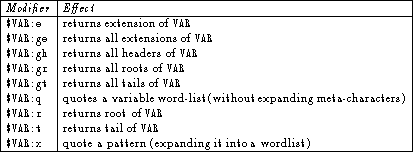
Table 4.5: Modifiers in the C shell.
These terms require some additional explanation.
In order to best explain them, the variable VAR will be set as
follows:
% set VAR=(/usr/local/src/prog.c /home/normb/memo.text)
The main use for these modifiers is in working with pathnames, so they
will be explained in that particular context.
An extension is what is tagged onto a filename following a dot
(.) and the extension of $VAR is
c /home/normb/memo.text.
This may seem odd, but what has happened is that the extension of the
first pathname (c) has been returned along with the rest of the
variable which is the second complete path.
The variable modifiers will also accept an integer value to isolate a
particular word (anything between whitespace - not necessarily a word
in the traditional sense) within the variable.
To return the extension of the first word without returning words that
follow, the following modifier statement would be used:
% echo $VAR[1]:e
c
This way any extension from any word can be returned.
To return the extensions from all of the words contained in a
variable, the :ge modifier would be used.
This is called the global extension modifier.
A g in front of either the :e, :h, :r or :t
modifiers causes the same effect.
Another of the modifiers is the header (:h) modifier.
The header is the directory path where the program is found.
For example, $VAR[2]:h would return /home/normb, while
$VAR:h would return /usr/local/src /home/normb/memo.text
for the reasons outlined above for the extension modifier.
The root of a variable is everything up to but not including the
extension, and the tail is what follows the header (i.e. the tail is
the filename minus the path).
For example,
% echo $VAR[2]:t
memo.text
% echo $VAR:r
/usr/local/src/prog /home/normb/memo.text
% echo $VAR:gt
prog.c memo.text
If the variable name is enclosed in curly braces for any reason, the modifiers would go on the inside of the bracket.