


A global variable is one that is visible to all shells.
It is said to be global because it is not restricted to use by the
current shell.
To set a global variable in the C shell, the setenv command
must be used.
This command is used precisely the same as the set command with
the exception that it is used for setting global variables (often
referred to as environment variables).
To see a listing of the current global variables in use, the
setenv command can be used without any arguments.
To remove a global variable from use, the unsetenv command can
be used in the same manner that the unset command was used.
The C shell comes with a number of predefined environmental variables
which can be read and altered by the user.
The lower case variables displayed in the set example are a few of
these.
Predefined variables are generally lower case which is why it is a
good idea to use all upper case when a user defines his own variables
(global or otherwise).
Some predefined variables are set by the shell during login while
others need to be set by the user if he so desires.
Table 4.3 contains the predefined environmental
variables for the C shell as well a description and default setting
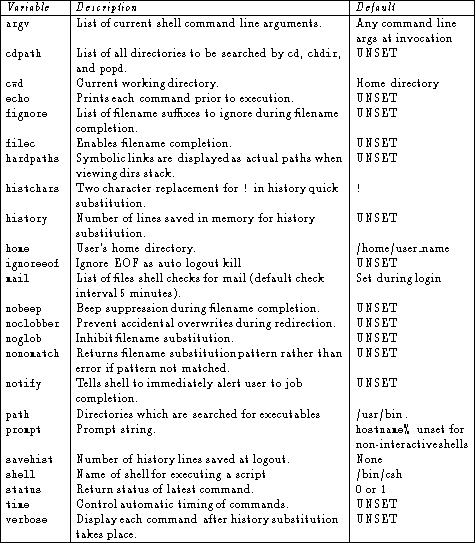
Table 4.3: Predefined environmental variables
and their default setting.
Not all of these variables would be given an explicit value when
activated.
Some of these variables are either set or unset.
The nobeep variable, for example, would be set by simply
entering setenv nobeep.
If the user wished to have any of these variables set during each
session, the variable assignments could be placed into one of the
login scripts.