


A very important test is often the status of a file.
Perhaps one test would be to test if a file exists before creating
another with the same name (which would of course destroy and replace
the pre-existing file).
The test command will test files for such attributes as
existence, writability, readability and file type.
Table 2.6 summarizes the file test formats and return
values.
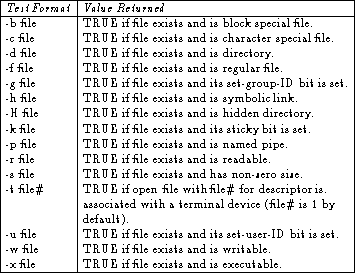
Table 2.6: File test formats and return codes.
To illustrate the use of file testing, the following is a script that
acts as a revised version of the UNIX move (mv) command.
Not only does this script check for overwrites, it also deletes
any file that is of zero size.
#! /bin/sh
#
# Move is a script that moves a file if no overwrite will occur
# and will delete the file to be moved if it is empty
#
# Usage: move [file] [destination]
#
if  [ ! -s $1 ]
then
   if rm $1 2>/dev/null
   then
       echo "$1 was empty and thus removed"
   else
       echo "$1 does not exist"
   fi
else
   mv -i $1 $2
fi
This example uses the if:then:else construct but also uses a
few things not discussed in much detail.
The first new idea was briefly covered in the section on
variables - parameters.
The $1 passes the name of the file being moved (the first name
entered on the command-line after move), and the $2 is
the destination or place that the file is moving to.
The Bourne shell allows nine such parameters, each separated by white
space, and therefore nine pieces of information can be passed to a
shell program from the command-line.
While the Bourne shell only accommodates direct access to nine
parameters (i.e. $1 through $9), nothing stops the user from
entering more.
The shell comes with a tool that permits access to more than nine
parameters.
More generally, this tool permits the use of an undetermined, at run
time, number of parameters.
This means that the script can let the user enter as many parameters
as he wishes on the command line and the program will handle any or
all of them as required.
This tool is the shift command.
The shift command slides the parameter list by a specified
number of places to the left and has the following form:
shift n
where n is the an integer that specifies how many places the
list will be adjusted.
If n is not explicitly given, the parameter list is moved one
place.
The following illustrates how the shift command works on a
parameter list of size n.
Before the shift command has been used, the list would look
like
$1 $2 $3 $4 ... $n
and after using shift:
$2 $3 $4 $5 ... $(n-1)
where after the shift command was used, the first parameter is
no longer accessible.
The number of parameters in the parameter list drops by the number of
places that the list was shifted as well.
For example, if a user inputed 5 parameters and then the script
shifted the list:
echo $#
5
shift
echo $#
4
where the 4 and 5 would be the output of the shell script. This presents a clever way of accessing any number of parameters in a script. To ensure that all parameters have been processed, a simple test command can be incorporated into the script as follows:
while [ $# -ge 1 ]
   do
   echo $1
    .
    .
    .
   shift
   done
This script piece will print the parameters, carry out some unspecified tasks, and repeat until all of the parameters passed have been exhausted.
If a script is written to expect a certain number of parameters, and the user places too many on the command line, the program will only use as many as were required. This means that if the script expects 2 parameters, and the user enters 3, only the first two entered will be used. If, on the other hand, the user enters fewer parameters than the script was written to expect, it will fill the un-entered parameters with a null value (i.e. they will be empty).
Another new idea (from the previous example script) was that of having
one if statement within another, which is called a nested
if statement.
This allows tests and decisions to be made as a result of earlier
tests.
Nested decisions allow very specific testing with less coding than
would otherwise be the case.
Notice that the first if statement uses a ! character,
which negates the test, or turns a TRUE value to a FALSE value and
vice versa.
The comments have been included to give some description of the task the script will carry out. One commented line in particular gives the expected usage of the script which allows the user to have knowledge of which order to enter the parameters on the command-line. This is not required but is good practice - especially if the script is to be used by people other than the programmer.
There is a third type of test that can be made.
This is the integer comparison test.
This type of test is done when comparing the values of two integers.
The first integer, the one on the left, is compared with the one on
the right.
For instance, the following tests to see whether Integer1 is
greater than Integer2:
$ test Integer1 -gt Integer2
There are in total six comparisons that can be made between two
integers: if they are equal (-eq); if the are not equal
(-ne); if Integer1 is greater than Integer2
(-gt); if Integer1 is greater than or equal to
Integer2 (-ge); if Integer1 is less than
Integer2 (-lt); and finally, if Integer1 is less
than or equal to Integer2 (-le).
In the Bourne shell, mathematical expressions cannot be simply
assigned to a variable.
This means that the expression a=b+c is not valid.
To get the result of an arithmetic expression, the expr command
must be used.
This command evaluates the arithmetic expression, and then returns the
result.
There are five arithmetic operators that can be used in the Bourne
shell:
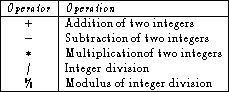
Table 2.7: Arithmetic operators in the Bourne shell.
The multiplication and division operators have higher presidence than
do the addition and subtraction operators.
The order can be arranged in any fashion however, with the use of back
quotations (`).
The Bourne shell does not recognize parenthesese.
For example,
$ expr 3 + 2 \* 8
19
is different from
$ expr `3 + 2` \* 8
40
Note also, that the multiplication operator (*) was escaped in the
expression.
This is because the shell tries to use the charater as a filename
expansion if it is not escaped.
One last important note on arithmetic expressions is that the division
operator is integer division.
This means that when one integer is divided by another integer and the
result is not itself an integer, the remainder is dropped and only the
integer portion of the division is returned.
The modulus operator can be used however to return the remainder of
the operation.
It may be neccessary to use more sophisticated compound tests in a
decision, and therefore tests can be combined using logical AND and OR
operators.
A compound test is a fancy way of saying that two simple tests are
combined into a single test using logical operators.
The logical AND operator is written -a, while the logical OR
operator is written -o.
To illustrate the use of a compound test, consider the situation where
a file is tested for readability as well as for writability:
if [ -r prog_name -a -w prog_name ]
then
   command list
fi
A test can also be negated by placing the ! character before
the test:
if [ ! -x prog_name ]
then
   lpr prog_name
else
   echo ``Are you sure you want to print an executable file?''
fi
The if:then:else construct works well for handling one or more
decisions in the flow of a script, but an even better construct is
available for handling decisions where many choices are available -
the case construct.
In these situations, the case construct is simplier to
impliment than the if:then:else construct.
The case statement takes a value, or pattern, and compares it with a
list of patterns.
The number of patterns is up to the programmer's discression, but
there is no imposed limit.
Along with each pattern in the list is a list of commands.
The first pattern that matches the initial value has its command list
executed.
The case construct has the following format
case value in
   pattern1)
       command list;;
   pattern2)
       command list;;
       .
       .
       .
   patternN)
       command list
esac
The double semicolons are used to signify the end of a command list.
The last group of commands does not require the double semicolons as
the esac statement signifies the end of the construct, which
implies the end of the last group of commands.
More than one pattern can be entered on a line if they are separated
by the logical OR symbol (|).
When multiple patterns are used in this way, the first line that has
any one of its patterns matched has its command list executed.
Character substitutions, such as * and [], can also be
used in a pattern.
Since the patterns in the comparison list are compared from top to
bottom it is always good practice to use the meta-character (*)
as the last pattern choice to handle any unexpected choices.
The case construct is especially useful in menus of choices
such as the following:
echo ``Do you wish to delete $FILE ?''
echo ' '
echo ``q or quit  Quits''
read ANSWER
case $ANSWER in
   y|Y|yes|YES)
      echo ``Removing $FILE'';
      rm $FILE;;
   n|N|no|NO)
      echo ``$FILE was not removed'';;
   q|Q|quit|QUIT)
      exit 1;;
   *)
      echo ``$ANSWER was not an understood option'';
      exit 2
esac
The only command used here which is yet to be covered is the
read command which gets input from the user.
This is covered in the section on input-output.