


Environmental variables are variables that have special meaning to the shell. These are to be used to customize the environment for a particular user. These variables should be defined in the special program that is executed during login called the .profile (dot profile) file. Any defined variables would then be set until the end of the session unless explicitly unset or redefined. An example of a .profile file is included in the section on programming. Table 2.3 contains an alphabetical list of the Bourne shell environmental variables, a brief description of what each is used for, and the default setting.
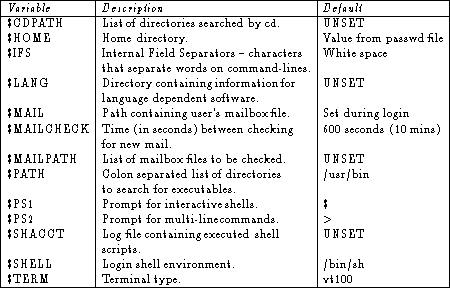
Table 2.3: Bourne shell environmental variables.
To make these variables global (so that they maintain their value in
any subshell) the export command must be used.
For example if you use ---> for a prompt in the current shell
and then start up a subshell, the prompt will be $ again.
To remedy this situation use the export command:
$ PS1="--->"
$ export PS1
To see a list of environmental variables currently set and their
settings, one can use the env command.
A typical listing might be as follows:
$ env
COLUMNS=80
HOME=/users/smith
LINES=24
LOGNAME=smith
MAIL=/usr/mail/smith
PATH=/bin:/usr/bin/:/users/smith/bin
SHELL=/bin/sh
TERM=vt100