The situation often arises where the user desires that the output of a
command go to a file rather than to the screen, or that the output of
a command go directly to another command.
The Bourne shell provides a group of features to handle both
situations.
The shell recognizes the following redirection characters: the output
(>), the input (<), the output append (>>), and
the input from standard in (<<) (stdin is almost always
the keyboard).
The output (>) symbol sends the output of a command to a file
as follows:
$ ls -l >filename
which will send the long listing of the current directory to the file
called filename.
The difference between the (>) and the (>>) is that the
append (>>) symbol causes the output of the command to be
directed to the end of the file if it already exists or else it
creates the file. The standard output redirection operator (>)
will create the file in order to write the output and if this file
exists it will overwrite it.
The input operator (<) causes the filename to the right of it
to be used as input to the command.
These can mixed up and used together such as the following example
which counts the number of lines in a file called text_file
and puts the result in a file called line_count:
$ wc -l <text_file >line_count
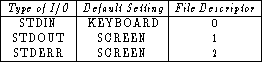
Another way to redirect output is with the use of file descriptors. File descriptors give numeric values to the three types of input and output (I/O): standard input (stdin) or the keyboard by default, standard out (stdout) or the screen by default, and standard error (stderr), error messages are also sent to the screen by default. Table 1.1 lists the file descriptor for each case:
To use these file descriptors to redirect output any of the following forms could be used:
$ command >&D redirects output to D,
$ command <&D get input for command from D,
$ command >&- closes standard output, and
$ command <&- closes standard input,
where D is one of the three file descriptors.
Slightly more complicated I/O redirections can be constructed using
file descriptors such as
$ command 2>err.file
which sends the error messages from the command to a file called
err.file.
Probably the most common use of file descriptors comes when the user's
desire to send stdout and stderr to a file.
This would be accomplished by the following:
$ command out.file 2>&1
This will send both the output and error messages of the command to a
file called out.file.
While this is a slightly complicated command to remember, it is well
worth the effort.
Pipelines are used to pass the output from a command and feed it into
another command to be processed.
The symbol for a pipeline is |.
A good illustration of using a pipeline might be to count the number
of users logged onto the user's system which could be accomplished by
$ who | wc -l
Some command pipelines can be accomplished in more than one way. For example,
$ cat text_file | wc -l
gives the same result as
$ wc -l <text_file
Users can determine which method they prefer, but keystroke-conservation is usually the motivating factor. For either pipes or redirection, as many items as desired can be linked together, and pipes and redirection can be mixed on a command-line.