Throught this book the topic of redirection will be visited many
times.
Redirection is where data is sent to or from when interacting with a
command.
Fo instance, when a user logs onto a terminal on the local network, a
group of messages may be displayed, or perhaps just a prompt.
The messages or prompt have been sent to the terminal window for the
user to read, in the case of the messages, or interact with, as would
be the case of the prompt.
This output stream, as it is called, is sent to what is called the
standard output (STDOUT).
This is usually automatically set to be the screen of the workstation
or terminal, although this hasn't always been the case.
In the very early days of UNIX, STDOUT may well have been a teletype
machine, long since extinct.
When a program (or equivaently, a command) is executed, the output can
be redirected to file by using the > operator.
The general syntax for all of the shells covered in this book (and any
other shells for that matter) is the following:
PROMPT> command name >filename
it would not be an error to have a space between the > and the
filename, it is just a matter of taste.
When a program requires input, like the program which runs the login
procedure, accepts data via the input stream called standard input
(STDIN).
This is almost always set to the keyboard, for obvious reasons.
A command will often take data from either a file or STDIN, as is the
case with the cat (concatenate command):
PROMPT> cat filename
which would send the contents from the file filename to the
screen.
The following would repeat to echo whatever the user had entered to
the screen, after pressing the <ENTER> key, until the end of file
(EOF) character (usually Control D) had been entered:
PROMPT> cat
Hello There <ENTER>
Hello There
How are you? <ENTER>
How are you?
<CTRL D>
PROMPT>
The last important data stream is the standard error. When a program (or command) is executed, it might encounter problems completing its task for whatever reason. When this happens, the shell will, in most cases, echo an error message to STDERR. By default, STDERR is directed to the screen along with STDOUT, but it doesn't have to be. Situations may very well arise where the error messages might be sent to a file, or somewhere else, while the standard output would be sent to the screen. The shells handle this situation in different ways so examples demonstrating this procedure will be left until the individual chapters.
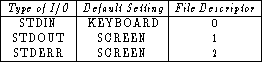
In UNIX these data streams can also be referred to by numbers called file descriptors. This provides another way to represent redirections but is again shell dependent and will thus left to the appropriate sections for examples. The following table associates each file descriptor with the corresponding data stream: