


This last topic on Bourne shell programming deals with the way
programs can handle interruptions.
An interruption can be anything from a terminal being disconnected to
the computer running out of memory. What happens if an interruption
occurs during execution of a script?
This is not an easy question to answer as the answer is basically that
it depends on what kind of interruption has occured.
If, for example, the power to the system was lost, there is really
nothing that can happen since the computer will no longer be
operational.
If however, the user presses an interrupt (or break) key, the question
is still not answered.
Will the program stop immediately or will it finish executing the
current loop, or perhaps nothing will happen.
What actually happens depends on a command called trap.
The trap command allows the user to have the program carry out
a command string of one or more commands prior to exiting the script.
If more than one command is contained in the string, the commands
should be contained in quotes as described in the section on shell
special characters, and command execution.
The syntax of the trap command is as follows:
trap command(s) signal(s)
One situation where this command is extremely useful is where information is being written to a file (to be removed at normal exit of the program) and an interruption (or using correct UNIX terminology, a signal) is sent which would by default cause the program to terminate. If program termination occurred prior to normal exit from the program, the default action would terminate the program and leave the mess behind. Adding the following to the script would allow the clean-up to occur before termination due to a user break (control-C):
trap `rm tmp/*; exit 1;`
Care must be taken for a couple of reasons when trapping signals. First, the signals which may be trapped vary from machine to machine, and second, the definite kill signal (9) cannot be trapped on any machine. What follows is a typical table of signals and the event which causes them:
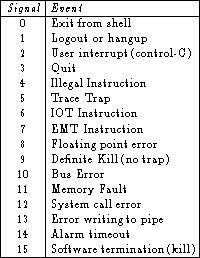
Table 2.9: Signals and the event which causes them.
The details of this list are not really important as there are only a few which will be trapped in ordinary day-to-day activities: 0, 1, 2 and 15. One should also note that the default (ie. not using trap) is always immediate termination of the script.