


Now that the programming structure has been covered, it would be nice
to be able to interact with the program while it runs.
As has been shown above, the program can write out to the screen, a
file or a device, and can even read in information from the user.
While all of the above examples have used some form of output, in the
form of an echo statement, they have not utilized any of the
special escape characters provided.
The following is a list of these special characters and their purpose.
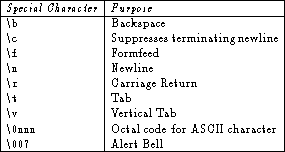
Table 2.8: Escape characters in the Bourne shell.
A couple of these characters are extremely useful for interacting with
the user.
For example, the \c character can be used when getting input
from the user to prevent the cursor from dropping to the next line:
$ echo ``Do you wish to continue? \c''
Do you wish to continue? $
Until the newline character is entered, any text entered will be
displayed on the same line as the input prompt.
Another useful special output character is the system, or alert, beep
\007 which can be used when alerting the user that a problem or
error has arisen:
if [ ``$password'' = ``'' ]
then
    echo ``You must not have a null password \007''
    exit 1
fi
Shell scripts can also take input from stdin.
User input allows shell programs to be fully interactive, which will
add to their generality.
The read statement is used for this purpose.
The read statement will cause the shell to accept an input
string to be read in until a newline character is encountered.
The shell removes all white space (with the obvious exception of
newline characters) but does not interpret filename or character
substitutions.
The shell takes the input string and breaks it up into substrings
which are surrounded by white space.
The read statement has the following form:
$ read Variable1 Variable2 Variable3 ... VariableN
where each variable is an expected substring.
If, for example, the user is expected to input two filenames, the
read statement would be
$ read file1 file2
If the user accidentally enters three files rather than two, the second variable will be assigned the last two file names. If on the other hand, there are more variables than substrings entered, the unmatched variables will be null, or empty.